Connection Pool Exhaustion at WorkOS Was a Hold-and-Wait Bug
WorkOS added capacity and nothing improved. How a nested transaction caused connection pool exhaustion, the three signals that identify it and the fixes.
Quick Answer
WorkOS's July 16, 2026 outage came from connection pool exhaustion that extra capacity could not fix. A nested transaction meant to reuse its connection asked the pool for a second one while still holding the first, so under a burst every connection was held by a request waiting for another. The signature is a saturated pool, a healthy database and scaling that changes nothing. The fix is to find work that holds one connection while waiting for a second.
Connection pool exhaustion is the state where every connection in an application's database pool is checked out, so new requests queue or time out even though the database itself may be idle. We think the WorkOS incident is one of the clearest public examples of the hardest version of it, where adding capacity does nothing because the pool is starved by its own requests.
WorkOS published an unusually complete postmortem, including the dead ends. That makes it possible to read the failure mechanism precisely rather than guess at it.
This post covers the timeline, the hold-and-wait mechanism, why the pool stayed starved after the burst, the three signals that identify this class, where it hides in most codebases, and the fixes that address it.
Ninety Minutes of Ruling Things Out
According to the WorkOS postmortem, an anomalous pattern of concurrent session-creation traffic began at about 07:01 UTC and arrived in waves. Customer-facing service stayed healthy until about 08:00 UTC, when a larger synchronised wave pushed the affected database path into starvation.
Alerts fired and an incident was declared between 08:06 and 08:26. From 08:26 to 09:48, responders ruled out the usual drivers, including deployments, feature flags and volumetric attacks. They identified connection starvation with the database itself healthy, and increased service capacity without improvement.
The root cause was isolated at 09:50. WorkOS disabled the AuthKit Analytics write at 10:07, service recovered by about 10:10, and connection metrics were back to normal by about 10:15. We read the ninety minutes in the middle as the cost of a failure that does not match the scale-it-up mental model.
How a Nested Transaction Caused Connection Pool Exhaustion
A normal session-creation request performed two writes, a product event and an additional event for AuthKit Analytics. WorkOS says the two were intended to share one database connection, with the analytics write wrapped in what the application treated as a nested transaction.
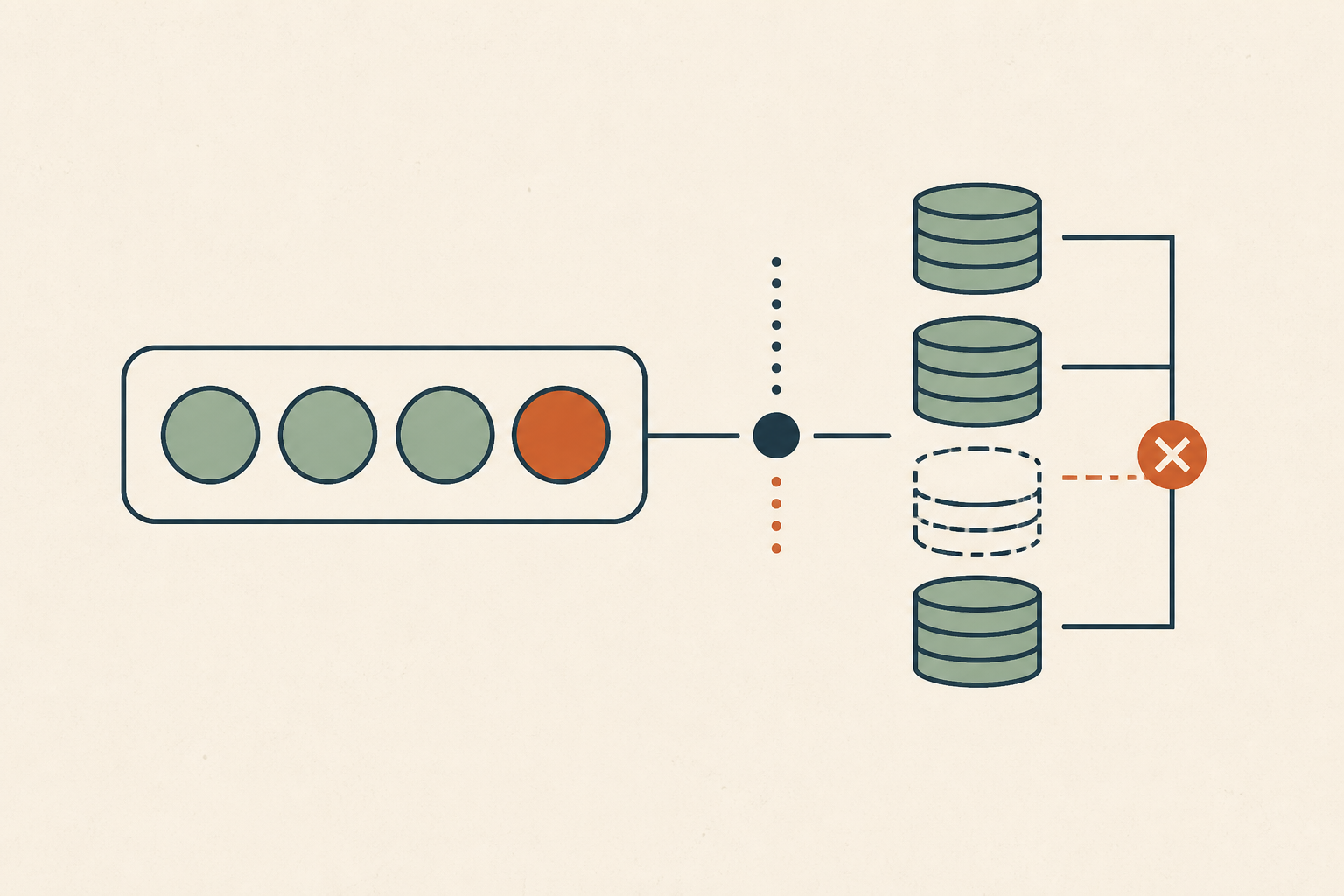
Because of a bug in the ORM library, that nested transaction requested a second connection from the pool while the first transaction was still open. At low concurrency nobody would notice, because each request briefly uses two connections and the pool has room.
Under a burst the arithmetic changes. In a pool of N connections, once N requests have each taken one connection and are waiting for a second, there is nothing left to give them, and none of them can finish to release what it holds. This is the classic hold-and-wait condition for deadlock, except the waits here end in timeouts rather than lasting forever.
WorkOS states the trigger and the cause separately, which we think is the right discipline. "The traffic increase was the trigger, not the root cause," the postmortem says. The root cause was the latent transaction bug combined with insufficient workload isolation, which let lower-priority analytics work hold a connection while waiting for another.
Why the Pool Stayed Starved After the Burst Passed
One might expect the pool to recover once the initial burst subsides, and WorkOS describes why it did not. Queued requests remained, normal traffic kept arriving and some timed-out requests were retried. Whenever a connection was released, queued work took it and could enter the same two-connection pattern.
The individual requests holding connections kept changing, but the pool stayed saturated. WorkOS also notes that its connection-borrow timeout was too long, which prolonged the exhaustion.
That last point is worth checking in your own stack. HikariCP's connectionTimeout setting, for example, controls how long a caller waits for a connection from the pool, and its documented default is 30 seconds. A long borrow wait keeps doomed requests alive and holding everything else they have acquired, which is the opposite of what a starved pool needs. Our post on retry storm amplification explains how retries make the same loop worse.
Three Signals That Separate Hold-and-Wait From Plain Overload
Pool saturation alone does not tell you which problem you have. A pool can also saturate because queries are slow, because a lock is held, or because traffic genuinely exceeds capacity. We look for three signals together, because each one alone points somewhere else.
1. The Pool Is Saturated and Borrow Waits Are Climbing
Every connection is checked out and the time requests spend waiting to borrow one rises sharply. This is the symptom every pool problem shares, so on its own it only tells you where to look next.
2. The Database Is Healthy
CPU and I/O on the database are normal, and there is no lock pile-up at the engine level. The database is waiting for work rather than struggling with it. WorkOS responders identified exactly this, connection starvation with the database itself healthy.
If the database is busy instead, the cause is more likely slow queries or locking. Our guides on idle-in-transaction sessions and Postgres lock queues cover those cases.
3. Adding Capacity Changes Nothing
More application instances or a larger pool do not reduce the error rate, because the new capacity enters the same pattern and is consumed by it. WorkOS saw this directly, describing the lack of improvement as "consistent with the failure mode."
When all three hold at once, we stop scaling and start looking for code that holds one resource while waiting for another of the same kind. That reframing is the single biggest time saver in this class of incident.
Where Hold-and-Wait Hides in Your Codebase
This is not a WorkOS-specific bug. It is a pattern that appears wherever optional work runs inside a critical-path transaction and can ask for its own connection. We would look in these places first.
- ORM nested transactions or savepoint helpers that silently open a new connection instead of reusing the current one.
- Audit, analytics or event writes that use a different client or session configuration from the main transaction.
- Shared pools serving both critical user paths, such as login and payment, and lower-priority background or reporting work.
- Request handlers that call another internal service, which then calls back into the same database pool.
Finding these by reading code is slow. A faster route is to correlate pool metrics with the code paths active during a saturation event, which is the kind of investigation you can run once you connect an investigation stack read-only to your logs, database and repositories. Either way, the goal is a list of every path that can hold two connections from the same pool.
Three Fixes With Different Half-Lives
WorkOS addressed the defect, the architecture and its containment separately, and we think that split is the right template.
1. Fix the Defect
Make nested work reuse the connection already held. WorkOS changed the analytics write to use the primary transaction's connection and uses a real savepoint on that same connection for error isolation. In PostgreSQL, the SAVEPOINT command establishes a new savepoint within the current transaction, so no second connection is needed.
2. Isolate Optional Work
Move non-critical writes out of the synchronous request path, and add runtime controls that can disable them without a deploy. WorkOS added independent runtime controls for session analytics and is moving analytics out of the auth path entirely.
3. Contain the Failure
Shorten the borrow timeout so blocked work fails fast and releases capacity, and bound concurrency per workload so one kind of request cannot take the whole pool. The SRE book's chapter on addressing cascading failures makes the general point that high deadlines let lower-level problems consume resources higher in the stack.
When More Connections Really Is the Fix
We do not want to overcorrect. Many pool saturation incidents are plain under-provisioning, and a larger pool or more instances is exactly the right response.
The difference shows in the signals. If the database is busy, if adding capacity reduces errors even slightly, or if a single request never holds more than one connection, this is not hold-and-wait. In that case we would size the pool against the database's real connection limit and move on, rather than auditing every transaction.
What the WorkOS Postmortem Does Well
We think this postmortem is worth reading as a model. It separates trigger from root cause, publishes a UTC timeline that includes the dead ends, and explains why the incident continued after the trigger passed.
Its follow-up actions are split into completed work, such as the transaction fix, regression tests and runtime controls, and dated work, such as the shorter borrow timeout, architectural isolation, a broader transaction audit and load testing above normal pool concurrency. That structure lets a reader check later that the promised work happened.
Audit for Connection Pool Exhaustion Before the Next Spike
Every system eventually gets an unusual burst of traffic. The question is if that burst meets a code path that holds one connection while waiting for another. We would run a short audit this quarter to answer it.
List the paths that can take two connections from one pool, check that borrow timeouts are shorter than request deadlines, and confirm optional writes can be switched off at runtime. When the next connection pool exhaustion incident starts, Operate runs dedicated AI agents that investigate the root cause with evidence from your logs, database and code, and propose a fix as a patch for an engineer to review.
Frequently Asked Questions
It is the state where every connection in an application's database pool is in use, so new requests wait or time out. We find the database is often healthy at the same time, because the limit being hit is the pool's size or the way requests hold connections, not database capacity.
It is the same condition seen from the database side, where the application cannot get a connection although the database may have spare capacity. We check database load, borrow wait times and how many connections each request holds before deciding to resize anything.
First find out why connections are held. We look for slow queries, idle-in-transaction sessions and requests that take two connections at once, then fix that cause, shorten the borrow timeout and only then consider a larger pool if the database has headroom.
If each request can hold one connection while waiting for another, a bigger pool just lets more requests enter the same stuck state. We treat scaling that changes nothing as a strong sign of hold-and-wait or a shared bottleneck elsewhere, not a capacity shortfall.
Common causes include slow queries, long transactions, connection leaks, traffic beyond the pool's size and code that holds one connection while requesting another. We see the last one most rarely, but it is the hardest to diagnose because the usual fixes do not work.
About the author
Operate Team
The team behind Operate
Operate Team builds Operate, enterprise AI agents for production operations. Operate answers production questions from Slack and Microsoft Teams, investigates alerts, and reviews performance, security and cost. It finds the root cause with evidence and proposes a fix for an engineer to review, with controlled access to your systems.